How to Reset Infinix Phone When Locked 7 easy mothed
Blazing Info >> Tips>> How to Reset Infinix Phone When Locked 7 easy mothed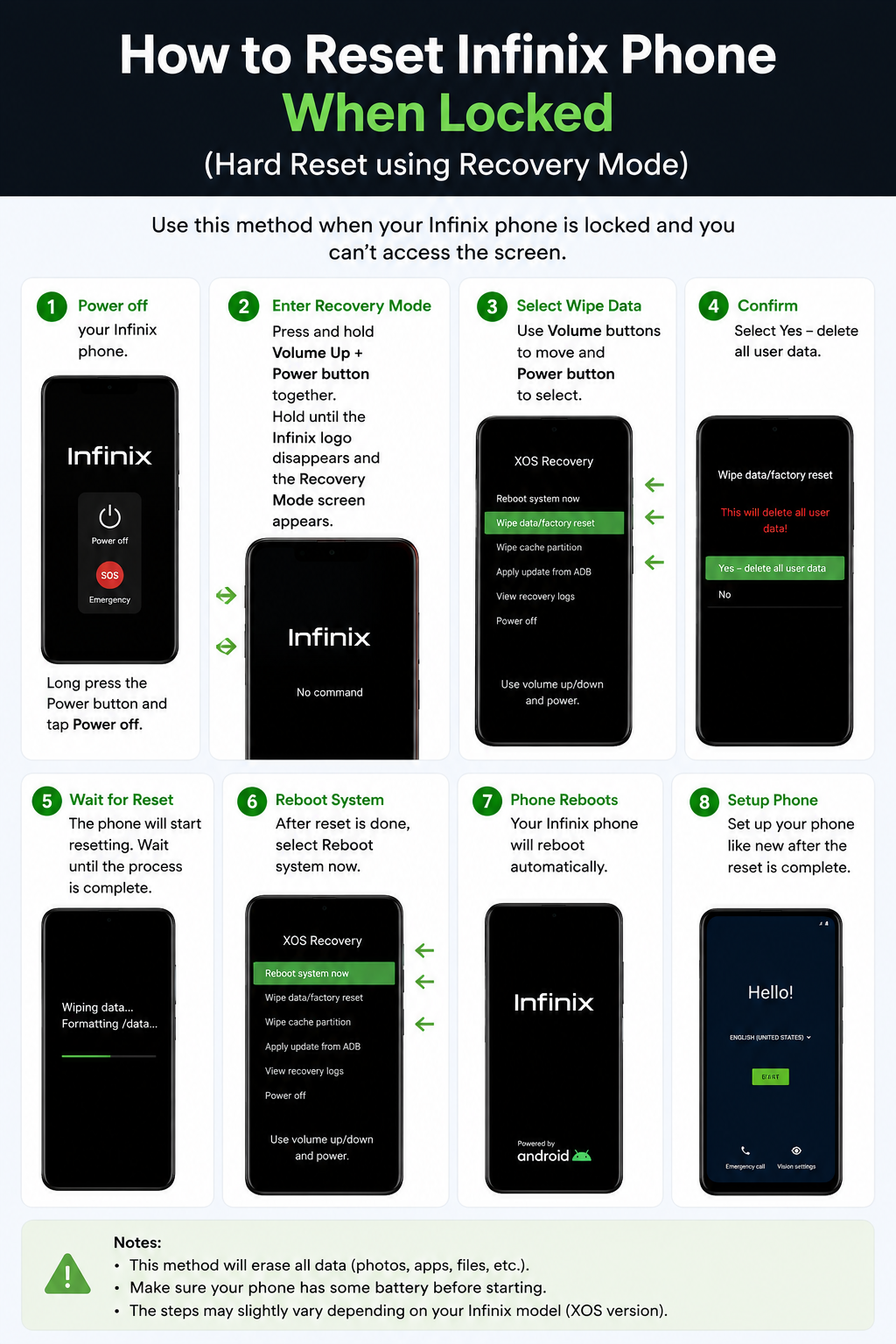
How to Reset Infinix Phone When Locked 7 easy mothed
How to Reset Infinix Phone When Locked 7 easy mothed
Getting locked out of your Infinix phone can be frustrating, especially if you forget your password, PIN, or pattern lock. Fortunately, there is a simple solution. You can perform a factory reset using Recovery Mode to regain access to your device.
In this guide, you will learn how to reset an Infinix phone when locked in a few easy steps.
What Happens When You Reset an Infinix Phone How to Reset Infinix Phone When Locked ?
A factory reset removes all data stored on your phone, including:
- Apps and app data
- Photos and videos
- Contacts saved on the device
- Settings and preferences
Before proceeding, remember that resetting your phone will erase all personal data that is not backed up.
How to Reset Infinix Phone When Locked
Follow these steps carefully to How to Reset Infinix Phone When Locked 7 easy mothed :
Step 1: Power Off Your Infinix Phone
Press and hold the Power Button until the power menu appears. Select Power Off and wait for the device to shut down completely.
Step 2: Enter Recovery Mode
Press and hold the Volume Up Button and Power Button simultaneously.
Keep holding both buttons until the Infinix logo appears. Release the buttons when the Recovery Mode screen opens.
Step 3: Navigate the Recovery Menu
Use the Volume Up and Volume Down buttons to move through the menu options.
Highlight Wipe Data/Factory Reset and press the Power Button to confirm.
Step 4: Confirm Factory Reset
A confirmation screen will appear.
Select Yes or Delete All User Data using the volume keys and confirm with the power button.
Step 5: Wait for the Reset Process
Your Infinix phone will begin erasing all stored data. This process may take several minutes.
Do not turn off the phone during the reset.
Step 6: Reboot the Device
Once the reset is complete, select Reboot System Now.
Your phone will restart automatically.
Step 7: Set Up Your Phone
After rebooting, the device will display the setup screen.
Sign in with your Google account and complete the initial setup process.
Common Recovery Mode Key Combinations for Infinix Phones
Different Infinix models may use slightly different button combinations:
- Power + Volume Up
- Power + Volume Down
- Power + Volume Up + Volume Down
If one method does not work, try another combination specific to your model.
Important Notes Before Resetting
- Charge your phone to at least 50% battery.
- Remove the memory card if necessary.
- Back up important files whenever possible.
- Make sure you remember the Google account linked to the device.
Frequently Asked Questions about How to Reset Infinix Phone When Locked
Can I Reset My Infinix Phone Without a Password?
Yes. You can reset your Infinix phone without a password by entering Recovery Mode and performing a factory reset.
Will a Factory Reset Remove the Screen Lock?
Yes. A factory reset removes the PIN, password, and pattern lock. However, you may still need to verify the previously linked Google account due to Factory Reset Protection (FRP).
Does Resetting an Infinix Phone Delete Everything?
Yes. A factory reset erases all data stored on the device’s internal storage.
Conclusion
If you are locked out of your device, learning how to reset an Infinix phone when locked can help you regain access quickly. By entering Recovery Mode and performing a factory reset, you can remove the screen lock and restore the phone to its factory settings.
Follow the steps above carefully, and your Infinix smartphone should be ready to use again within minutes. If you are unable to unlock after these steps you may visit a mobile or computer shop in your local area for reset software reset. After reset may your mobile ask for email or gmail verification if you did it by hard reset or may not. Thanks For Visiting us with your love how to reset infinix phone when locked, infinix hard reset, reset locked infinix phone, factory reset infinix phone, infinix recovery mode, unlock infinix phone without password and you have learnt How to Reset Infinix Phone When Locked 7 easy mothed.
Related Post